Tuesday, February 19, 2013

A Single Thread of Execution in App Inventor Screens

The development documentation provides a very good example of why certain things in the User Interface (UI) of an app happen in the way they do. In App Inventor we use Screens to lay out components to create the UI of the app.

The main idea is that all actions that affect the UI happen sequentially. Some examples of these kind of actions could be changing the text of a label, or handling users interacting with the app via a button or a text box.

Sequential execution in App Inventor means that different blocks can never interrupt each other.

Different blocks and handlers will always be executed in sequence. Once a block starts executing, it will execute till the end, no matter if there are other blocks reacting to the one in progress, or users pressing buttons in the app. On more technical terms, we say that everything in the UI is executed in one Thread, the UI Thread, which is responsible for all updates and interaction that happen in each Screen of your app. For this to happen, we need some kind of mechanism to keep track of what needs to be done next, and when something should be done. A very simple model would be a Queue, just like the one you join at the supermarket to pay for your shopping. Tasks can be added to a Queue in the same way that people join in the queue from the end of it.

With all this in mind, let's see the example in the documentation. (From How to add a component )

This gives a simple execution model for users: An App Inventor procedure will never be interrupted by an event handler, or vice versa; nor will one event handler be interrupted by another. This is illustrated in Figure 1:” (Ellen Spertus)
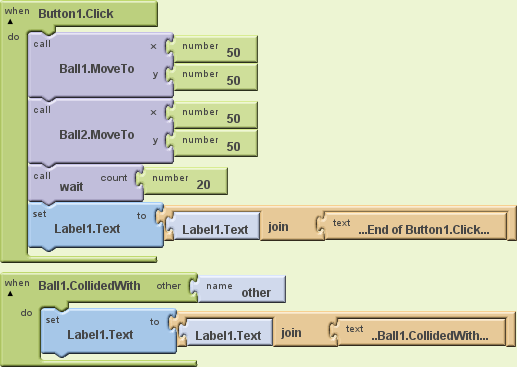
Figure 1: Sample program demonstrating serial semantics.
The example uses two Ball components, one CollidedWith handler that should fire as soon as Ball1 collides with anything, and an extra procedure called wait, which we don't really see what it does, but we are going to suppose that it takes 20 seconds to execute (imagine that it is loading content from the internet and it takes that long). All the code, except for the collision handler, is contained within a Click handler.
When Button1 is clicked, the two balls are positioned in exactly the same place, first Ball1, and then Ball2. Positioning the second ball in the same place as Ball1 should trigger the collision handler for Ball1. Some users would expect this to happen straight away, but if you were to execute this code, you would see that the collide handler will not execute until the click block finishes, and this would take at least 20 seconds because of the call to wait.

Following the same idea as above, you can think about the UI thread as if it was a Queue to get into the cinema; on arrival, ticket buyers will position themselves at the end of the queue.
When Button1 is clicked, we add the following things to the Queue:
  • position Ball1
  • position Ball2
  • wait
  • set Label1 text to : '...End of Button1.click...'

When Ball2 is positioned, the CollideWith handler is added to the Queue, but it cannot be executed straight away because the UI thread still has some tasks to do. So, after a couple of seconds we will see a queue such as:
  • position Ball1 (DONE)
  • position Ball2 (DONE)
  • wait (IN PROGRESS)
  • set Label1 to: '… End of Button1.click ...' (TO DO)
  • CollidedWith (added to the queue when the collision happens)
    • set Label1 text to: '… Ball1.CollidedWith ...' (TO DO)

So Ball2 makes the handle trigger, but that does not mean that it will be executed straight away, instead it means that it will be added to the queue in the UI thread.

In the end, Label1 will always be assigned the value '...End of Button1.click...' first, and the value '...Ball1.CollidedWith...' later.
When both blocks finish, it will always read: “...End of Button1.Click......Ball1.CollidedWith...”.

Please note that having a procedure like wait blocking the UI is a really bad idea in an app, because as we saw in the explanation above, the app will be unresponsive for those 20 seconds, and this is not a pleasant experience for the users. If your app needs to do some expensive processing, it is quite possible that this interaction will block the app for as long as it takes.

From a design and development point of view, it is also important to note that certain blocks in App Inventor were designed with the UI thread in mind, and broken down into two different stages. For instance, the Web component Get call could be considered part 1 of a call to a web resource. This call will not block the UI because it is not performed in the UI Thread. When the response from the Get call is received, then part 2 will execute, which would be the event GotText (or GotFile, depending on how Get was configured). If you are planning on developing a new component for App Inventor, you need to take this into account.

Also related to this idea of sequential execution, a lot of users ask why their timers do not fire on time, for instance exactly every 2 seconds. Actually the timers fire at the time they are supposed to, but this only means that their handlers get added to the scheduling queue for UI updates. If at that particular moment something else is executing in the Screen, then the actions fired by the timer will have to wait for those other actions to finish, before they can be triggered. But once they get next to be executed in the Queue, they will fire one after the other, not waiting for any intervals. The waiting was already done before joining the Queue. 

This is actually something very usual in UI libraries, from Java (Swing) to Android, and even JavaScript. The browser, in which JavaScript executes, also has a single thread of execution, generally called the event loop, and it will behave in the same way as App Inventor does. Same happens if you run JavaScript on the server through something like node.js.

This is all a simplification of what really happens, and Android can create other Threads of execution that do not conflict with the UI thread to carry on with other operations. For a deeper dig in the matter, follow the link in the Android documentation to the Painless Threading article.

Friday, August 17, 2012

Going back to work!

Last December I decided to quit my job and take 6 months off to focus on my PhD (Informal learning applied to computer programming). A lot has happened since, and it's been a fantastic time, but it is almost 9 months now since then, and it's time to look for full-time employment again.

Last May, when I had originally intended to go back to the market, I stumbled upon the opportunity of joining the App Inventor team at MIT through the Google Summer of Code programme. After some thought, and knowing that I wanted to do it, I went for it. I can only say that it's been a fantastic experience, I've learnt a lot, and have met some really interesting people.
App Inventor is built on top of the Android SDK, but there's a lot more to it than just Android. Other technologies used in the project are GWT and App Engine, and a portion of the system is built using Kawa, a Java implementation of Scheme. It's been a lot of fun hanging out with the team on G+, and designing a new workflow for App Inventor apps, but the programme is only 3 months long, and although I will keep working on the project in my spare time (it's open source, you can join us too!), the 3 months will be up soon.

Looking for a job in these times of so called recession will probably be harder than when I first arrived in Ireland, many years ago. There's also a lot to be said for working in something that you particularly enjoy, in a culture that suits you. All that stuff about intrinsic motivation that many companies don't seem to care much about, it matters a lot to me.

So, what am I looking for and/or what can I offer to my employer? Well, most of my experience is with Java and also have a small node.js app in production. I have written a tiny bit of python and have finished the saas class (rails) if that's of any use (I have a certificate!). I like no nonsense software processes (sometimes called Agile by some), and I like practices such as TDD, pair programming, and code reviews. I am happy eager to learn new things, and have a research background in education, social learning theories, and some related areas such as organisational theory, apprenticeship, and open source. I have a CV that I can send upon request, and I also have a github account and this blog. I co-organise some dev meetups in Dublin, to get people together and hack a bit or hear some presentations (dublinjs, frazzle, and a couple of code retreats). Also like meeting people online, and participating in communities such as P2PU and Open Wonderland, mostly around open source projects and learning.

And that is all I can think of right now; If that sounds like what you are looking for, please do get in touch.

Sunday, April 22, 2012

Roman Numerals Kata revisited

More than a year ago I wrote a post and recorded a video about the Roman Numerals Kata. To be honest I haven't been doing many katas lately but as I've had this weekend for myself, I went back and revisited the Kata, in JavaScript this time. And also recorded a video:


I am not really sure about how my coding has changed in the last year. There's no doubt that JavaScript uses a very different philosophy to Java, and I'm a lot more confident writing JavaScript now, but other than that, not much seems to have changed.

The only common pattern I see is that TDD is really helpful. In both screencasts you can see me doing something wrong (mixing up symbols last year, and forgetting to set the main function for immediate invocation this year, for instance) and only by having tests failing I realised that they were problems. It really saves you time if you don't have to deploy your code and play around with it to see what you've broken. Also, being the first user of your own code allows you to put a bit of thought in your design.

In this version I was not interested about recursion or Maps in Java, and I decided to skip the outer BDD layer (although Jasmine would allow me to do so). What was more interesting was to go through the different Module pattern incarnations in JavaScript, and using jasmine-node from the command line, although the --autotest option keeps crashing on me so I cannot use it! I am not the biggest fan of autotest utilities but for these kind of deliberate practice they are actually quite nice.

Thursday, March 8, 2012

A read-only API for P2PU

I've been part of the P2PU community for a good while now, and have organised a couple of groups within their platform so I thought it was about time to give back. On top of that, they use Python and Django, two pieces of technology that up to a month ago or so were completely unknown to me and I have always wanted to learn. Not that  I know all that much about them right now, but there's nothing better for learning than using the tools in a real context and within a real project, so that is exactly what I've been doing for the last couple of weeks. #opensource_ftw!

After an initial proof of concept using tastypie, as recommended by the chaps in the python.ie mailing list, I have started to work on it a bit more seriously and it will hopefully soon enough be reviewed and merged with the main Lernanta codebase. My fork of Lernanta has an API branch where you can find all the code to date.


And you might be wondering... why am I telling you all this? Because I could do with some help! If you want to learn not only Python and Django but aslo about RESTful architecture and web services do not hesitate in joining me.

Illustration by @alisonjeancole


You can also have a look at the blog post in the main P2PU blog.

Sunday, February 26, 2012

Dublin GameCraft 2012

I spent the day with more than 100 game developers and designers yesterday at Dublin GameCraft. It was a lot of fun and although Donall and I didn't really submit our entry for any prizes, we recorded a short video of what we got up to, and here it is:


The topic of the day was: Dinosaur Angst, and as you can see, our dino was pretty angry! Our half baked game was based on OpenSimulator, using stuff we found in the web and LSL. Certainly not the best platform for good gameplay for a shooter, but it was fun to make, the atmosphere in the place was awesome, and have met some really nice people so that's what I call a great day!

Thursday, January 19, 2012

Open Wonderland - Best View proposed changes

Best View is about the most useful capability ever! It works great with objects with an aspect ratio very similar to your screen, but it's not as good with wider objects such as a cardwall.

You can see what I mean in the following video:


So scratching an itch, I've been working on a patch to add functionality to the capability so that you can focus on certain parts of the object. The key modifiers I'm proposing are:

Mouse wheel = zoom in and out
alt + Mouse wheel = move left and right
alt + crtl + Mouse wheel = move up and down

UPDATE
The keys to be used now are:

Mouse wheel = zoom in and out
ctrl + Mouse wheel = move left and right
ctrl + shift + Mouse wheel = move up and down


The mouse wheel effect also works with trackpads and Mac mouse devices by just sliding a finger as if you had a real wheel.

The patch has not been reviewed yet but if you want to give it a go, I have sent it to the mailing list, and I would appreciate any testing and feedback. Just take into account that it might be rejected.

Wednesday, January 11, 2012

New Year, New Wonderland Project

Another year begins and so does another Wonderland Wednesday Project. This time we have decided to improve the telepointer module that is already part of the wonderland-modules project.

The current telepointer has a bit of a weird shape and it's a 3D object. I personally cannot think of the benefits of a 3D pointer as compared to a 2D one… sounds the same to me!
The user name renders on top of the pointer in billboard mode, and that makes parts of the word disappear depending on the surface that the pointer is held against. So the first 2 tasks we will go for first are to change the appearance to a more regular 2D shape, and more importantly, to make it work when you take control of a 2D app.

This module is a good example of a Wonderland Component or Capability. In this case, instead of being available to attach to any object in world, it is programmatically attached to all avatars through a server plugin. A nice example if you want to see how to do such a thing.

We will be working on this again on Wednesday the 18th of January so feel free to pop along to the community server at 1p.m. EST or 6p.m. here in Dublin.