The MIT App Inventor team is looking for a software engineer with interest in research in education, and, of course, open source.
You can find more information in this thread. If you want to know a little more about what we do, you can keep on reading this blog, or ping me on twitter and I'll be happy to talk to you.
What are you waiting for to apply? do it... now!
Showing posts with label java. Show all posts
Showing posts with label java. Show all posts
Friday, June 20, 2014

Saturday, May 17, 2014
App Inventor - Related Research
This is another slide deck from an MIT 6.S198 lecture, this time about EdTech in general, and more specifically about the many research influences that App Inventor and other similar systems share.
If you want to know more about the class, feel free to browse (and use, reuse, redistribute, improve, and so forth!) the materials linked from the class' calendar.
If you want to know more about the class, feel free to browse (and use, reuse, redistribute, improve, and so forth!) the materials linked from the class' calendar.
Thursday, May 2, 2013
Open Source Development with App Inventor: Part 0
Show all videos of this series.I am a big fan of tech video series. If I recall correctly, railscasts was the first one I watched, probably at about the same time that I started following TED talks (although the latter are not really a 'series' in itself, and not always about tech). Much more recently, I have very thoroughly enjoyed the AngularJS videos in egghead.io, and I tend to watch as many full conferences as I can.
No surprises here then if I tell you that I have started recording my own series, right? The topic is App Inventor and Open Source. I have no idea how often I'll get a chance to record a video, but if you want me to talk about an specific part of the project, I'll do my best to get it online. I will always try to keep them shorter than 10 minutes (that's the format I generally enjoy more), so some topics will be divided into multiple videos. I do not intend to do any editing, so at times, you'll see me doing some weird stuff and getting it all wrong, but I won't be cutting stuff off, mostly for the sake of learning. Feel free to shout to the screen (as I do... at times...) or leave a comment, and I'll do my best to get it right in another video.
I am going to start with the basics, but this isn't really a 'Learn Java' kind of series; there are millions of resources out there to learn Java and Android, so I doubt we need yet another one (and I also doubt I can do a better job!). So if you know a bit of Java (or some other language), and you are familiar with the command line, and building programs from it, you are all set for the series... so let's get started!
Part 0: Before you start
Here are the links in the video:
Where to find stuff?
Main OSS Website: http://appinventor.mit.edu/appinventor-sources/
Forum: https://groups.google.com/forum/#!forum/app-inventor-open-source-dev
IRC Channel: freenode.net #appinventor
Other links:
Article about the command line.
Github and CodeSchool interactive tutorial.
Wednesday, April 24, 2013
Long running tasks in App Inventor Components
(Many thanks to Mark Friedman from Google for his review and great comments).
As mentioned in the post about the UI thread, App Inventor is basically a UI centric system, in the sense that everything happens within a Screen. For this reason, when tasks that might take a bit of time to finish are required, they should be done in their own thread, or otherwise the full UI will come to a halt until the task finishes up.
Examples of long running tasks could be, among others, any operations that need access to external resources, such as the calls in the Web component, the calls to the Twitter API, calls to reading from the SD card, sending or retrieving data in TinyWebDB calls, and so on.
So how can these kind of operations be dealt with? Mainly by dividing the process into two stages, a first part that spins a new thread to deal with the operation itself, and a second part that can trigger an event back in the UI thread, once the operation is finished. This is the core idea behind Event-Driven Architectures or Event-Driven Programming, and most toolkits for creating graphical interfaces use it widely.
According to Wikipedia, Event-driven Programming can be defined as:
[...] an application architecture technique in which the application has a main loop which is clearly divided down to two sections:
- the first is event selection (or event detection)
- the second is event handling.
Let’s see it with a concrete example; Think about how the Web component in App Inventor works:
There are many other examples in the App Inventor sources showing this kind of event-driven approach to longer operations. When you are creating a component, think that any operation that needs to access resources such as the network or external storage, will need to be designed in this way. You might think that, for instance, if you only read small files from storage, then you will be fine doing it in the UI thread. You might even try it, and test it for a bit, and convince yourself that it works fine, but believe me, it will not cut it in the real world. Think about users with slower and older devices, or slow connections to the Internet, or simply think of a device that, at a particular time, might be busy doing some other operation such as upgrading a different app. You really want to get your design correct and functional for all your users out there!
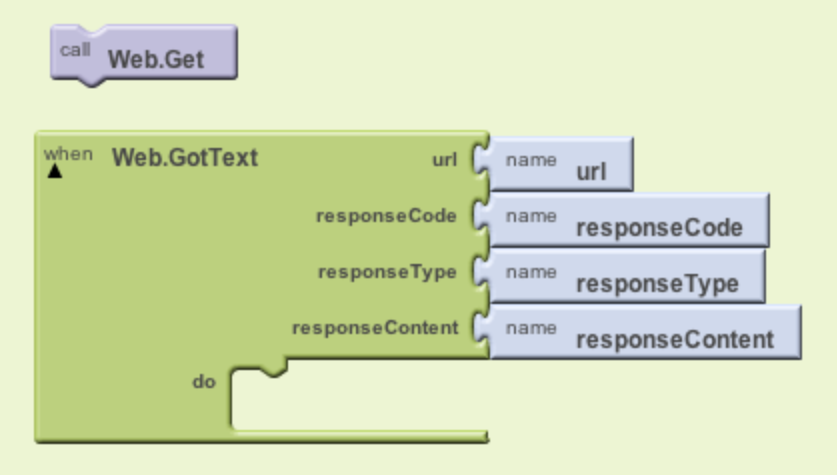 |
| Part 1: Call Get : Part 2: when GotText gets triggered, handle it. |
The user will place a Web.Get call block in a handler(such as a button click), and configure the component with the URL to be accessed. That is part 1 of our event-driven design. For part 2, the user needs to place a Web.GotText event block (or Web.GotFile) in the blocks editor, and they are assured that when this event is triggered, they can access the contents of the resource they had asked for (as well as the response code and type).
In programming terms, for a component developer, the Web.Get call block will have to create and launch a new thread to grab the resource that the user wants from the Internet. Once the resource is retrieved, this new thread will communicate back to the app by triggering the Web.GotText event in the UI thread. Let’s see this in code.
First part: running a new thread with the request
@SimpleFunction
public void Get() {
[... some config code here ...]
AsynchUtil.runAsynchronously(new Runnable() {
@Override
public void run() {
try {
performRequest(webProps, null, null);
} [... exception handling code here ...]
}
});
}
The main thing we want to observe here is that the call to performRequest is done inside a Runnable object, which will be a thread spawning from the UI thread. This is step 1 of our event-driven design. Whatever we need to do in this method, and however long it takes, is not a concern anymore (to a certain extent!) because it will be performed outside of the UI thread.
Second part: processing the request and going back to the UI thread
Lets see now what the performRequest method does, and how it connects back to the UI thread:
private void performRequest(final CapturedProperties webProps, byte[]
postData, String postFile) throws IOException {
// Open the connection.
HttpURLConnection connection = openConnection(webProps);
if (connection != null) {
try {
if (postData != null) {
writePostData(connection, postData);
} [... other code to write to file ...]
[... some more code to deal with the data; note that this code, and
other actions such as opening a HTTP connection at the top of
this method, can take a long time ...]
// Dispatch the event.
activity.runOnUiThread(new Runnable() {
@Override
public void run() {
GotText(webProps.urlString, responseCode, responseType, path);
}
});
[... more code to handle files instead of text responses ...]
} finally {
connection.disconnect();
}
}
}
What is going on here? Well, a HTTP connection is opened against the resource on the web that the user wants to access. Depending on configuration, the user can decide to save the response to a file, or in the code that we can see here, just treat it as text. Once the data is read from the web, this thread’s job is done, and it can invoke the user’s event handling block, which runs in the UI thread. It will do so by triggering the GotText method inside a Runnable object, but as you can see, it is run through the activity.runOnUiThread method in order to switch back to the UI thread.
Note that operations such as opening a HTTP connection will take a while and will also block the thread until they are done. That concept of blocking the thread is exactly what we are trying to avoid in the UI thread, but we don’t mind if this other thread gets blocked for as long as it needs. This is the basis of Asynchronous programming as explained in the previous blog post, and we can take advantage of it to give our users a more pleasant experience while using our apps.
Wondering what that AsyncUtil.runAsynchronously method in the Get function is about? Well, these longer tasks are so frequent in App Inventor that there is some supporting code to accomplish them. The class AsyncUtil.java can be used to spawn new threads for the component code. This is the method used in the Web component:
/**
* Make an asynchronous call in a separate thread.
* @param call a {@link Runnable} to run in the thread.
*/
public static void runAsynchronously(final Runnable call) {
Thread thread = new Thread(call);
thread.start();
}
It’s very simple code; you pass in a Runnable object, and the method creates a thread and starts it. This is the basic threading mechanism in Java. For more information have a look at the Concurrency tutorial.
There are many other examples in the App Inventor sources showing this kind of event-driven approach to longer operations. When you are creating a component, think that any operation that needs to access resources such as the network or external storage, will need to be designed in this way. You might think that, for instance, if you only read small files from storage, then you will be fine doing it in the UI thread. You might even try it, and test it for a bit, and convince yourself that it works fine, but believe me, it will not cut it in the real world. Think about users with slower and older devices, or slow connections to the Internet, or simply think of a device that, at a particular time, might be busy doing some other operation such as upgrading a different app. You really want to get your design correct and functional for all your users out there!
Tuesday, February 19, 2013
A Single Thread of Execution in App Inventor Screens
The development documentation provides a very good example of why certain things in the User Interface (UI)
of an app happen in the way they do. In App Inventor we use Screens to lay out components to create the UI of the app.
The main idea is that all actions that affect the UI happen sequentially. Some examples of these kind of actions could be changing the text of a label, or handling users interacting with the app via a button or a text box.
With all this in mind, let's see the example in the documentation. (From How to add a component )
The main idea is that all actions that affect the UI happen sequentially. Some examples of these kind of actions could be changing the text of a label, or handling users interacting with the app via a button or a text box.
Sequential execution in App Inventor means that different blocks can never interrupt each other.
Different blocks and handlers will always be executed in sequence. Once a block starts executing, it
will execute till the end, no matter if there are other blocks reacting to the one in progress, or users pressing buttons in the app. On more technical terms, we say that everything in the UI is executed in one Thread, the UI Thread, which is responsible for all updates and interaction that happen in each Screen of your app. For
this to happen, we need some kind of mechanism to keep track of what needs to be done next, and when something should be done. A very simple model would be a Queue, just like the one you join at the supermarket to pay for your shopping. Tasks can be added to a Queue in the same way that people join in the queue from the end of it.
With all this in mind, let's see the example in the documentation. (From How to add a component )
“This
gives a simple execution model for users: An App Inventor procedure
will never be interrupted by an event handler, or vice versa; nor
will one event handler be interrupted by another. This is illustrated
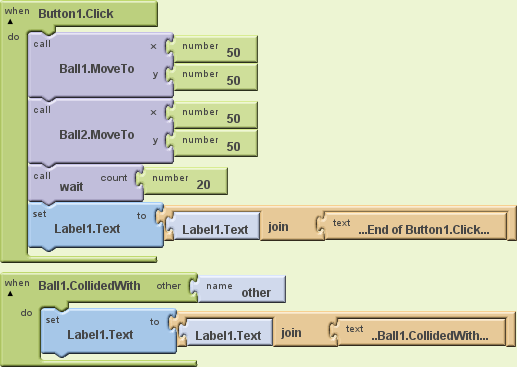
in Figure 1:” (Ellen Spertus)
 | |
|
The example uses two Ball
components, one CollidedWith handler that should fire as
soon as Ball1 collides with anything, and an extra
procedure called wait, which we don't really see what
it does, but we are going to suppose that it takes 20 seconds to
execute (imagine that it is loading content from the internet and it
takes that long). All the code, except for the collision handler, is
contained within a Click handler.
When Button1 is clicked,
the two balls are positioned in exactly the same place, first Ball1,
and then Ball2. Positioning the second ball in the same place as
Ball1 should trigger the collision handler for Ball1. Some users
would expect this to happen straight away, but if you were to execute
this code, you would see that the collide handler will not execute
until the click block finishes, and this would take at least 20
seconds because of the call to wait.
Following the same idea as above, you
can think about the UI thread as if it was a Queue to get into the
cinema; on arrival, ticket buyers will position themselves at the end
of the queue.
When Button1 is clicked, we add the
following things to the Queue:
- position Ball1
- position Ball2
- wait
- set Label1 text to : '...End of Button1.click...'
When Ball2 is positioned, the
CollideWith handler is added to the Queue, but it cannot be executed
straight away because the UI thread still has some tasks to do. So,
after a couple of seconds we will see a queue such as:
- position Ball1 (DONE)
- position Ball2 (DONE)
- wait (IN PROGRESS)
- set Label1 to: '… End of Button1.click ...' (TO DO)
- CollidedWith (added to the queue when the collision happens)
- set Label1 text to: '… Ball1.CollidedWith ...' (TO DO)
So Ball2 makes the handle trigger, but
that does not mean that it will be executed straight away, instead it
means that it will be added to the queue in the UI thread.
In the end, Label1 will always be
assigned the value '...End of Button1.click...' first, and the value
'...Ball1.CollidedWith...' later.
When both blocks finish, it will always read: “...End of Button1.Click......Ball1.CollidedWith...”.
When both blocks finish, it will always read: “...End of Button1.Click......Ball1.CollidedWith...”.
Please note that having a procedure
like wait blocking the UI is a really bad idea
in an app, because as we saw in the explanation above, the app will
be unresponsive for those 20 seconds, and this is not a pleasant
experience for the users. If your app needs to do some expensive
processing, it is quite possible that this interaction will block the
app for as long as it takes.
From a design and development point of
view, it is also important to note that certain blocks in App
Inventor were designed with the UI thread in mind, and broken down
into two different stages. For instance, the Web component Get
call could be considered part 1 of a call to a web resource. This
call will not block the UI because it is not performed in the UI Thread. When the response from the Get
call is received, then part 2 will execute, which would be the event
GotText (or GotFile, depending on how Get
was configured). If you are planning on developing a new component
for App Inventor, you need to take this into account.
Also related to this idea of sequential
execution, a lot of users ask why their timers do not fire on
time, for instance exactly every 2 seconds. Actually the timers
fire at the time they are supposed to, but this only means that their
handlers get added to the scheduling queue for UI updates. If at that
particular moment something else is executing in the Screen, then the
actions fired by the timer will have to wait for those other actions
to finish, before they can be triggered. But once they get next to be executed in the Queue, they will fire one after the other, not waiting for any intervals. The waiting was already done before joining the Queue.
This is actually something very usual
in UI libraries, from Java (Swing) to Android, and even JavaScript.
The browser, in which JavaScript executes, also has a single thread
of execution, generally called the event loop, and it will
behave in the same way as App Inventor does. Same happens if you run JavaScript on the server through something like node.js.
This is all a simplification of what
really happens, and Android can create other Threads of execution
that do not conflict with the UI thread to carry on with other
operations. For a deeper dig in the matter, follow the link in the Android documentation to the Painless Threading article.
Thursday, January 19, 2012
Open Wonderland - Best View proposed changes
Best View is about the most useful capability ever! It works great with objects with an aspect ratio very similar to your screen, but it's not as good with wider objects such as a cardwall.
You can see what I mean in the following video:
So scratching an itch, I've been working on a patch to add functionality to the capability so that you can focus on certain parts of the object. The key modifiers I'm proposing are:
Mouse wheel = zoom in and out
alt + Mouse wheel = move left and right
alt + crtl + Mouse wheel = move up and down
UPDATE
The keys to be used now are:
Mouse wheel = zoom in and out
ctrl + Mouse wheel = move left and right
ctrl + shift + Mouse wheel = move up and down
The mouse wheel effect also works with trackpads and Mac mouse devices by just sliding a finger as if you had a real wheel.
The patch has not been reviewed yet but if you want to give it a go, I have sent it to the mailing list, and I would appreciate any testing and feedback. Just take into account that it might be rejected.
You can see what I mean in the following video:
So scratching an itch, I've been working on a patch to add functionality to the capability so that you can focus on certain parts of the object. The key modifiers I'm proposing are:
Mouse wheel = zoom in and out
alt + Mouse wheel = move left and right
alt + crtl + Mouse wheel = move up and down
UPDATE
The keys to be used now are:
Mouse wheel = zoom in and out
ctrl + Mouse wheel = move left and right
ctrl + shift + Mouse wheel = move up and down
The mouse wheel effect also works with trackpads and Mac mouse devices by just sliding a finger as if you had a real wheel.
The patch has not been reviewed yet but if you want to give it a go, I have sent it to the mailing list, and I would appreciate any testing and feedback. Just take into account that it might be rejected.
Wednesday, January 11, 2012
New Year, New Wonderland Project
Another year begins and so does another Wonderland Wednesday Project. This time we have decided to improve the telepointer module that is already part of the wonderland-modules project.
The current telepointer has a bit of a weird shape and it's a 3D object. I personally cannot think of the benefits of a 3D pointer as compared to a 2D one… sounds the same to me!
The user name renders on top of the pointer in billboard mode, and that makes parts of the word disappear depending on the surface that the pointer is held against. So the first 2 tasks we will go for first are to change the appearance to a more regular 2D shape, and more importantly, to make it work when you take control of a 2D app.
This module is a good example of a Wonderland Component or Capability. In this case, instead of being available to attach to any object in world, it is programmatically attached to all avatars through a server plugin. A nice example if you want to see how to do such a thing.
We will be working on this again on Wednesday the 18th of January so feel free to pop along to the community server at 1p.m. EST or 6p.m. here in Dublin.
Thursday, August 4, 2011
Open Wonderland OurBricks module Preview 2
Another update on the OurBricks module to use within Open Wonderland. This time you can see the process end to end.
There are still a few glitches in the UI, not being very responsive, and the OurBricks API is likely to change in the near future as it is in active development, but the prototype is working now, as you can see in the video.
If you want to play with the sources you can find them in my github account.
There are still a few glitches in the UI, not being very responsive, and the OurBricks API is likely to change in the near future as it is in active development, but the prototype is working now, as you can see in the video.
If you want to play with the sources you can find them in my github account.
Tuesday, July 12, 2011
Code Review Session for Open Wonderland 0.5 Preview 5
Preview 5 is coming... finally!
The Open Wonderland community is closing off the last bunch of issues, being the major one the Video Module that will finally work out of the box, without having to fiddle with the sources. As usual, Jon is in charge of the really hard stuff (Thanks Jon!).
As always, this is a community effort and we are all trying to contribute as much as we can. If you would like to help us move forward please do not hesitate to contact us!
At the meeting, the usual suspects were around, and we all took on some of the problems to fix. On my side of things, I've been poking about with the Placemarks menu, trying to make it a bit more user friendly by alphabetising the marks, separating them in more logical chunks, and so on.
 |
| Discussing and Assigning Bugs in-world |
Last wonderland Wednesday session was devoted to discuss what was going to be fixed and added in the preview, and this Wednesday (July the 13th), we have organised a Code Review session after the normal Wednesday session.
I think a code review is a great way to learn, and it will definitely be very helpful for me, as I am not very familiar with the codebase. Please feel free to join us if you are interested in Wonderland development.
Thursday, May 19, 2011
Mutant-Java and the KataLonja
Another month and another Kata with the 12meses12katas crowd. This time the kata is in Spanish, and it was created by the agilismo.es guys for the professional track of XGN2011. If anyone needs/wants a translation, do get in touch and I'll produce one. You can find the original version in github: KataLonja.
The Kata is about a Galician chap who wants to make some money by selling Scalops, Octopus, and Spider Crabs in a hired van. We are given a series of prices that markets in different cities will pay for the goods, alongside with distances, transport costs, and depreciation rates for the food, and we need to provide the most interesting route to get a best sale for our intrepid entrepreneur.
As a Galician immigrant myself, this is the simplest kata ever: I would drive the van right into my garage and the goods straight into my fridge; as easy as that!
Sadly this is not going to happen so let's get back to the kata. I'm certainly nowhere near finishing it, I only gave it a first go last night before bed but some cool stuff is already coming up out of it.
As I mentioned in a previous post, I use Katas to refresh some concepts that I haven't seen in a while, or that although I might use them in my day job, I've never gone deeper at them than the old getting the job done.
Last month I choose JavaScript for the bowling kata, and because I started way too late (the last day of the month!), that was the only implementation that I practised on the day. I will try and get this one practised in both Java and JavaScript, starting with the former.
Java has no associative arrays and it's generally accepted that you will use Maps instead. Maps can be very straight forward if you are using an immutable object as the key for your pair, but can get tricky if you decide to use your own class. So that's exactly what I did. It might not be the best fit for the problem at hand, or yield the leaner and cleaner code possible, but no one will have to maintain this code and it's going to be thrown away anyway so better have a bit of fun with it!
So I have created an immutable class for Seafood that I will be using as a key for at least two maps I'm using in other classes. That means overriding equals() and hashcode(), and being careful with state and escaping references to this. But as I said above, the code is nowhere near written, so what's the point of the post you will be asking yourself? I just wanted to share 3 links that have been helpful in digging a bit deeper in the adventure so far. They are:
In them you will find good advice on stuff such as when to create immutable classes and how, uses of immutability including the flyweight pattern, overriding equals() and hashcode(), and a great discussion on how to keep the equals() contract on extended classes, adapted from the book Programming in Scala into Java.
I will be digging a bit more, hopefully in the next couple of days, in topics such as choosing the right map implementation and a couple more things that I want to try (I'd like to write my cucumber step definitions in Ruby instead of Java but I'm not sure I can do that, so will have to find out!).
I also intend to write another post if I ever get to practise the Kata in JavaScript. Comparing both implementations would be cool so let's hope for that!
The Kata is about a Galician chap who wants to make some money by selling Scalops, Octopus, and Spider Crabs in a hired van. We are given a series of prices that markets in different cities will pay for the goods, alongside with distances, transport costs, and depreciation rates for the food, and we need to provide the most interesting route to get a best sale for our intrepid entrepreneur.
As a Galician immigrant myself, this is the simplest kata ever: I would drive the van right into my garage and the goods straight into my fridge; as easy as that!
Sadly this is not going to happen so let's get back to the kata. I'm certainly nowhere near finishing it, I only gave it a first go last night before bed but some cool stuff is already coming up out of it.
As I mentioned in a previous post, I use Katas to refresh some concepts that I haven't seen in a while, or that although I might use them in my day job, I've never gone deeper at them than the old getting the job done.
Last month I choose JavaScript for the bowling kata, and because I started way too late (the last day of the month!), that was the only implementation that I practised on the day. I will try and get this one practised in both Java and JavaScript, starting with the former.
Java has no associative arrays and it's generally accepted that you will use Maps instead. Maps can be very straight forward if you are using an immutable object as the key for your pair, but can get tricky if you decide to use your own class. So that's exactly what I did. It might not be the best fit for the problem at hand, or yield the leaner and cleaner code possible, but no one will have to maintain this code and it's going to be thrown away anyway so better have a bit of fun with it!
So I have created an immutable class for Seafood that I will be using as a key for at least two maps I'm using in other classes. That means overriding equals() and hashcode(), and being careful with state and escaping references to this. But as I said above, the code is nowhere near written, so what's the point of the post you will be asking yourself? I just wanted to share 3 links that have been helpful in digging a bit deeper in the adventure so far. They are:
In them you will find good advice on stuff such as when to create immutable classes and how, uses of immutability including the flyweight pattern, overriding equals() and hashcode(), and a great discussion on how to keep the equals() contract on extended classes, adapted from the book Programming in Scala into Java.
I will be digging a bit more, hopefully in the next couple of days, in topics such as choosing the right map implementation and a couple more things that I want to try (I'd like to write my cucumber step definitions in Ruby instead of Java but I'm not sure I can do that, so will have to find out!).
I also intend to write another post if I ever get to practise the Kata in JavaScript. Comparing both implementations would be cool so let's hope for that!
Wednesday, April 13, 2011
Wonderland Wednesday -- Subsnapshot importer
We've been working on a new Open Wonderland module for exporting and importing parts of a world for the last couple of months. The idea is that when you have a world laid out, you might want to export bits and pieces, or even the whole space, to rebuild it at a later stage or in a different server, or simply as a backup of all your hard work.
Exporting is done by just right clicking in a model or container and choosing Export.
Importing is done by just dragging and dropping the exported file onto the Wonderland client. Easy peasy!
A couple of shots from today's session, in wich we are exporting and importing a bunch of the big fellas.
The module is taking this long to be developed because we are writing all the code as a group, and we only meet about 1 hour a week, so things are moving slowly.
As a result, we are all learning a big deal from each other, especially from Jon, but all of us have worked on parts of the module, which is really cool.
We are even using JUnit to test bits and pieces of the code. The codebase was not written with automated testing in mind, but we are doing all we can to move towards that direction, even if it's just in small doses, and the results are great so far, cause although we are quite far from being able to TDD or test-first even, testing after writing is saving us a lot of time in deploys and server restarts.
Better quality pictures can be found on facebook.
These sessions happen most Wednesdays at 1p.m EST, 6p.m GMT, and everybody is welcome, so hope to see some of you quite soon!
Exporting is done by just right clicking in a model or container and choosing Export.
Importing is done by just dragging and dropping the exported file onto the Wonderland client. Easy peasy!
A couple of shots from today's session, in wich we are exporting and importing a bunch of the big fellas.
 |
| Anyone needs an army? |
 |
| Well behaved big fellas |
 |
| bit to the left... bit to the right... perfect! |
The module is taking this long to be developed because we are writing all the code as a group, and we only meet about 1 hour a week, so things are moving slowly.
As a result, we are all learning a big deal from each other, especially from Jon, but all of us have worked on parts of the module, which is really cool.
We are even using JUnit to test bits and pieces of the code. The codebase was not written with automated testing in mind, but we are doing all we can to move towards that direction, even if it's just in small doses, and the results are great so far, cause although we are quite far from being able to TDD or test-first even, testing after writing is saving us a lot of time in deploys and server restarts.
Also we are not really pairing but 'grouping', and although communication can be harder than in the former, we are having a lot of fun, and that is what really counts!
These are a couple of shots of us working against netbeans and also the space we use, with the wallcard on the far end wall with all the stickies.
 |
| Close up of Netbeans in-world |
 |
| The group writing code, live |
 |
| The WallCard with all the stickies: we are almost there! ...almost! |
These sessions happen most Wednesdays at 1p.m EST, 6p.m GMT, and everybody is welcome, so hope to see some of you quite soon!
Sunday, February 27, 2011
Roman Numerals Kata
Last month I joined an initiative by a group of Spanish Agile followers called 12 meses 12 Katas. The idea is that each and every month during 2011, we will be practising a Kata, and sharing our code through github, and for those adventurous enough to record themselves, also through this vimeo channel.
There is a ton of resources in the net about what a Kata is and why are they important so I will not get into that, but I would like to stress the last bit of pragmatic Dave's definition:
"[...] remember that the point of the kata is not arriving at a correct answer. The point is the stuff you learn along the way."
After having practised the February Kata a bunch of times, I wanted to write a bit about the process and reflect on my own deliberate practice and learning journey during these last couple of weeks.
As I mentioned earlier, the kata was a bit long for a video so I have sped it up! Generally katas are recorded with a piece of classical music as background. I've chosen a piece from my extensive collection, which pretty much means that it was the only 1 out of 6 classical tracks in my itunes that was long enough for the video!!! Hope you enjoy it!
Roman Numerals Java + cuke4duke (Double speed) from Josmas Flores on Vimeo.
There is a ton of resources in the net about what a Kata is and why are they important so I will not get into that, but I would like to stress the last bit of pragmatic Dave's definition:
"[...] remember that the point of the kata is not arriving at a correct answer. The point is the stuff you learn along the way."
After having practised the February Kata a bunch of times, I wanted to write a bit about the process and reflect on my own deliberate practice and learning journey during these last couple of weeks.
When I first saw the Kata, I thought it was going to be easy peasy. Yes, totally missed the point; it's not about the problem but about practising it, but in any case, I was so very wrong! It turned out to be a lot more complex than anticipated, and I even thought for a couple of days that I was having some type of programmers block. Sticking to strict TDD didn't help much either, when you are not as used to use it as you first thought!
I went through 3 different solutions:
The First solution was very complex and it was very influenced by Maths. I was tracking all this positions for different numbers, and had a ton of if branches and all that. Messy!
Then I saw a recursive solution to the Kata. YES, I SAW IT; call it cheating if you want to, I couldn't care less. When I saw the simple solution, it made me think...Why did I start coding without thinking a bit about the problem itself. I should have a look at the relations among numbers, which ones are the special cases, and so on. In a nutshell, the Domain is very important, even in small projects. That was Lesson one for me, hope it sticks!
I'd say it has to do with our nature or background as scientists. That initial thought of 'I can do this with a bit of math', yields an answer, but it is too complex, not so difficult to write, but long, and difficult to maintain. A quick but thorough look at the domain shows that the cases can be simplified if you play a bit with them. Special cases such as 4, 9, and all numbers terminating in any of the two, can be easily automated.
So I started working on a recursive solution. At first I wrote a recursion with a wonky base case, and it worked anyway on one direction (arabic to roman), but it did not for the opposite. There was a mix here of problems with copy by value in Java, and objects and primitives. If it hadn't been for the primitive case, I wouldn't have noticed the flaw in the recursion. Which leads me to think that test are great, but obviously not a silver bullet! You still have to get the algorithm right! Another example of this can be seen in my video, when I mix up L and D in the tests themselves! So Lesson two is: no silver bullets.
Recursion can feel easy at times, but when it is easy to write, it makes you wonder if there is another way. And in fact there was. In this case a simple loop could yield the same results as the recursion, and that was my last solution.
I feel that I have a better understanding of what Katas are good for, after practising them deliberately for the last couple of months. When you are in the job, you just go to the point, and choose a collection, or refactor to an iterative process, but you don't get to dig out more information. Doing the kata in my own time, I consider that spending some of it in the details of how to choose that collection, or when to refactor is far more beneficial. This is something I had read about before, but never experienced by myself. Lesson three: deliberate practice is necessary.
What else did I learn/review this month?
- review of Maps in Java (mainly due to the fact that I needed order in my collection). Although I started the kata with arrays (some people will say that it was faster and all that), I decided to go for a map in the end, cause having two different arrays (one for arabic numbers and one for their roman counterparts) was not expressing the intent of the mapping.
- review of recursion and refactorings applied to the recursion itself. Interesting to find out that most newish compilers will automatically substitute a tail recursion for an iteration for you, so if the intent of the algorithm is clearer with the recursion, I will definitely go with that form from now on.
- I wanted to use cucumber for acceptance testing so finally got to set up cuke4duke to run cucumber features on Java programs. It is so much fun!
- Writing cucumber features has reminded me (yet again) of my little knowledge of regular expressions. Also brings up the fact that writing features is a lot harder than reading somebody else's. Hopefully if I use them more, both things will stick in my brain, at least the basics anyway!
- Lastly, it has been quite strange to watch my kata after recording it. Does not feel like it is me (especially due to my supersonic typing up speed! Nah, it's fake, I've doubled up the speed cause the Kata was far too long!). It's definitely the case that what you think you are doing and what you actually do are two different things. The more I see it, the more I'd like to change things. But I think that that is good anyway!
As I mentioned earlier, the kata was a bit long for a video so I have sped it up! Generally katas are recorded with a piece of classical music as background. I've chosen a piece from my extensive collection, which pretty much means that it was the only 1 out of 6 classical tracks in my itunes that was long enough for the video!!! Hope you enjoy it!
Roman Numerals Java + cuke4duke (Double speed) from Josmas Flores on Vimeo.
Friday, January 14, 2011
Open Wonderland Development Course at P2PU
I am organising an 'Open Wonderland Development course' at P2PU. This is a course that follows a peer to peer approach, it is all community based, and totally free.
About P2PU
The Peer to Peer University is a bit different. All work is done through p2p collaboration. Courses generally run for 6 weeks (next batch starting on the 26th of January 2011). You do not need to be an expert to organise a course, mainly because of the fact that you will be a facilitator, as opposed to a teacher/lecturer. All you need is a collection of open accessible resources to run a course (you can also create your own).
I think this model fits perfectly the software profession, if you compare it with the individualised approaches of any 'normal' university. You will not get a degree after finishing a course, but you might get much more out of it...
About Open Wonderland
Open Wonderland is a toolkit to create virtual worlds. It is 100% Java, it has a relatively small core, but its extensibility through 'wonderland modules' makes of it a platform to do pretty much whatever you want within the 3D environment. Out of the box you can share X11 apps within the world (Open office, Chrome, Eclipse, or freemind work pretty well), communicate through text, voice, or even the telephone, and drag and drop all kinds of digital materials such as pdf files, images, etc.
You can also write your own modules. One of the available modules is an scripting engine based on "JSR 223: Scripting for the Java platform". Using this module you can script objects inside the virtual world using any language supported by the specification (Javascript, PHP, Ruby, and so on).
The project was initially born at Sun Microsystems in 2007, but support from Sun/Oracle stopped earlier last year(2010). It was an open source project from inception and although most people envisioned its death after Oracle laid off the team, it has been quite a different story since then. The community has taken control of the project through the creation of the Open Wonderland Foundation (non-profit), and all kinds of meetings inworld have been happening ever since. All Wednesdays at 1pm (EST) there are development meetings in which the community share an instance of Netbeans and hack on code as a group (every avatar can take control of the instance and start driving).
I do have to say that things are going a lot slower, no doubt of that, but there are more users now than ever before, and development continues at a steady pace.
Motivation
So, why am I doing this, what's in it for me? The experience really. I was not part of the initial wonderland team and my association has not been other than as a volunteer in the community for the last few months. I thought this would be a good way to give back to the community.
I am also a researcher in IT in Education, and this is just a way for me to experiment with ideas, mostly taken from Software Craftsmanship.
I see a few different ways that learning can be organised around the wonderland system (apart from development work which will also be covered).
Although it is a fairly big system (with a small core), test automation is almost inexistent. One of my goals would be to start inspecting the system by testing it from within, and see where that leads us. There is a test harness in place, but it hasn't been used much and it would be great to inspect that too.
Another course for experimenting is the building system. Ant scripts exist for the system but dependency management is not explicit. The build is also way too dependent on netbeans.
These are two scenarios that people are quite likely to find in their everyday job. So, what's in it for you? Well, the experience really! :)
Some people might find attractive the fact that some out of the office learning can being organised (to a point) by someone else. I say 'to a point' because, as mentioned earlier, this is a peer to peer experience, I am not an expert, and learning is ultimately the responsibility of the participants themselves.
This is a 'distance learning experience', and I do not expect people meeting face to face, but I do expect meetings avatar to avatar. It is definitely not the same (nowhere near!) but in my opinion is the closest experience to the real thing that I've had so far.
In a nutshell
So, as a summary, if you are interested in learning through technology, be it software development, testing automation, scm, and so on, and you want to do it within an existing system, and more importantly, in a collaboratively, community-based way, please have a look at the course.
Link to the course: http://www.p2pu.org/general/open-wonderland-development-java
Dates: starting on January the 26th (2011)
Pre-requisites: Please read through the sign-up task (main page of the course) before applying.
About P2PU
The Peer to Peer University is a bit different. All work is done through p2p collaboration. Courses generally run for 6 weeks (next batch starting on the 26th of January 2011). You do not need to be an expert to organise a course, mainly because of the fact that you will be a facilitator, as opposed to a teacher/lecturer. All you need is a collection of open accessible resources to run a course (you can also create your own).
I think this model fits perfectly the software profession, if you compare it with the individualised approaches of any 'normal' university. You will not get a degree after finishing a course, but you might get much more out of it...
About Open Wonderland
Open Wonderland is a toolkit to create virtual worlds. It is 100% Java, it has a relatively small core, but its extensibility through 'wonderland modules' makes of it a platform to do pretty much whatever you want within the 3D environment. Out of the box you can share X11 apps within the world (Open office, Chrome, Eclipse, or freemind work pretty well), communicate through text, voice, or even the telephone, and drag and drop all kinds of digital materials such as pdf files, images, etc.
You can also write your own modules. One of the available modules is an scripting engine based on "JSR 223: Scripting for the Java platform". Using this module you can script objects inside the virtual world using any language supported by the specification (Javascript, PHP, Ruby, and so on).
The project was initially born at Sun Microsystems in 2007, but support from Sun/Oracle stopped earlier last year(2010). It was an open source project from inception and although most people envisioned its death after Oracle laid off the team, it has been quite a different story since then. The community has taken control of the project through the creation of the Open Wonderland Foundation (non-profit), and all kinds of meetings inworld have been happening ever since. All Wednesdays at 1pm (EST) there are development meetings in which the community share an instance of Netbeans and hack on code as a group (every avatar can take control of the instance and start driving).
I do have to say that things are going a lot slower, no doubt of that, but there are more users now than ever before, and development continues at a steady pace.
Motivation
So, why am I doing this, what's in it for me? The experience really. I was not part of the initial wonderland team and my association has not been other than as a volunteer in the community for the last few months. I thought this would be a good way to give back to the community.
I am also a researcher in IT in Education, and this is just a way for me to experiment with ideas, mostly taken from Software Craftsmanship.
I see a few different ways that learning can be organised around the wonderland system (apart from development work which will also be covered).
Although it is a fairly big system (with a small core), test automation is almost inexistent. One of my goals would be to start inspecting the system by testing it from within, and see where that leads us. There is a test harness in place, but it hasn't been used much and it would be great to inspect that too.
Another course for experimenting is the building system. Ant scripts exist for the system but dependency management is not explicit. The build is also way too dependent on netbeans.
These are two scenarios that people are quite likely to find in their everyday job. So, what's in it for you? Well, the experience really! :)
Some people might find attractive the fact that some out of the office learning can being organised (to a point) by someone else. I say 'to a point' because, as mentioned earlier, this is a peer to peer experience, I am not an expert, and learning is ultimately the responsibility of the participants themselves.
This is a 'distance learning experience', and I do not expect people meeting face to face, but I do expect meetings avatar to avatar. It is definitely not the same (nowhere near!) but in my opinion is the closest experience to the real thing that I've had so far.
In a nutshell
So, as a summary, if you are interested in learning through technology, be it software development, testing automation, scm, and so on, and you want to do it within an existing system, and more importantly, in a collaboratively, community-based way, please have a look at the course.
Link to the course: http://www.p2pu.org/general/open-wonderland-development-java
Dates: starting on January the 26th (2011)
Pre-requisites: Please read through the sign-up task (main page of the course) before applying.
Tuesday, November 30, 2010
Java Puzzlers at Strange Loop
Just came across the latest Java Puzzlers presentation by Josh Bloch and Bob Lee at strange loop earlier this year. 7 new puzzlers to make your brain hurt, and your jaw drop a little bit when you see the solutions and morals.
Spoiler alert! If you like puzzlers stop reading now!
This is my take on it:
Do not use raw types, the compiler will resolve to the best match for the type and cast automatically, and this can get you into trouble with overloaded methods.
Choosing the right types might not be enough; look for quirky differences among constructors for those types, such as BigDecimal(double) and BigDecimal(String).
Avoid using Varargs and arrays together, and prefer collections to arrays, especially in APIs.
Be careful with catastrophic backtracking when using regular expressions (not only in Java!).
I do not know enough about map.entrySet() and HashSets, so I got lost in that puzzle. I will have to watch it again. But in any case:
Iterating over entry set should be done with care.
When in doubt, use a larger type to avoid overflow problems.
Leading 0s transform the number in octal literals. Use with care!
And lastly, Do not ignore compiler warnings; they can get you out of trouble before you hit it at runtime!
Josh Bloch mentioned that findbugs catches 5 of the 7 pitfalls, so if you were thinking about giving it a go, this is a good reason to get you started!
Spoiler alert! If you like puzzlers stop reading now!
This is my take on it:
Do not use raw types, the compiler will resolve to the best match for the type and cast automatically, and this can get you into trouble with overloaded methods.
Choosing the right types might not be enough; look for quirky differences among constructors for those types, such as BigDecimal(double) and BigDecimal(String).
Avoid using Varargs and arrays together, and prefer collections to arrays, especially in APIs.
Be careful with catastrophic backtracking when using regular expressions (not only in Java!).
I do not know enough about map.entrySet() and HashSets, so I got lost in that puzzle. I will have to watch it again. But in any case:
Iterating over entry set should be done with care.
When in doubt, use a larger type to avoid overflow problems.
Leading 0s transform the number in octal literals. Use with care!
And lastly, Do not ignore compiler warnings; they can get you out of trouble before you hit it at runtime!
Josh Bloch mentioned that findbugs catches 5 of the 7 pitfalls, so if you were thinking about giving it a go, this is a good reason to get you started!
Subscribe to:
Posts (Atom)